Configuring Global Inputs
The Global Inputs grid is used to define global (default) input values, minimum and maximum ranges, and point values to use in a calculation when no such values are specified for a pack segment. The global inputs will be used only if the value is not specified by a custom calculation rule or base input rule. Each value is treated independently, so if a global minimum value is set, it would be used on a pack segment input that had no minimum value set, even if it did specify a maximum value. The input value can either be a set value or the value of a specified point. The inputs listed differ depending on the pipeline content and calculation choices.
|
Click the thumbnail to see |
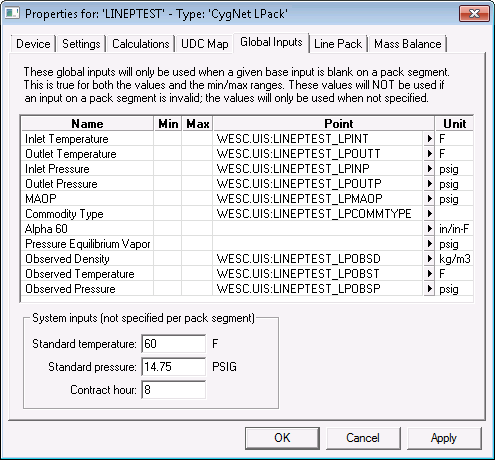
See the following subsections below for more information:
Inputs by Pipeline Content
The following table lists the various global inputs by pipeline content.
| Natural Gas | Supercritical CO2 | Petroleum Liquids |
|---|---|---|
|
Atmospheric Pressure Volume Correction Factor Specific Gravity Carbon Dioxide Carbon Monoxide Nitrogen Hydrogen Average temperature inputs (see below) Average pressure inputs (see below) Supercompressibility Factor Energy Content MAOP inputs (see below) Base temperature Base pressure Contract hour See Natural Gas UDCs for definitions of these inputs. |
Atmospheric Pressure Average temperature inputs (see below) Average pressure inputs (see below) MAOP inputs (see below) Measured Inlet Density Measured Outlet Density Contract hour See Supercritical CO2 UDCs for definitions of these inputs. |
Average temperature inputs (see below) Average pressure inputs (see below) MAOP inputs (see below) Commodity Type (see note below) Alpha 60 Pressure Equilibrium Vapor Observed Density Observed Temperature Observed Pressure Standard temperature Standard pressure Contract hour See Petroleum Liquids UDCs for definitions of these inputs. |
Inputs NotesNote: Inputs depend on the calculation type selected on the Calculations page. Average temperature inputs Temperature: 1 — Temperature: n or Inlet Temperature and Outlet Temperature Average pressure inputs or Inlet Pressure and Outlet Pressure or Inlet Pressure, Outlet Pressure, and Pressure: 1 — Pressure: n MAOP inputs or or or Inlet MAOP, Outlet MAOP, and MAOP: 1 — MAOP: n Commodity Type 0: Unknown (Requires the "Alpha 60 thermal expansion factor" to be set) 1: Crude 2: Refined unspecified 3: Refined Fuel Oils 4: Refined Jet Fuels 5: Refined Transition 6: Refined Gasolines 7: Lubricating Oil 8: Special Apps |
||

Global Input Properties
The properties for each section of this page are described below.
| Column | Description |
|---|---|
|
(Global Input) Name |
The list of global inputs to be used in a calculation when no such value is specified for a pack segment. The inputs differ depending on the pipeline content and the calculation choices, as shown above. Calculating MAOP at the same average pressure requires two inputs: Inlet MAOP and Outlet MAOP. See Configuring UDC Mappings for descriptions for these inputs. |
|
Min and Max |
The Min and Max fields can be set to specify a range for the input. One, both, or neither of the fields can be set. If a value specified by a custom rule is out of range, a warning will be generated and the value from the base inputs is used. |
|
Point |
The Point column specifies the value to use if an input is not specified or set by a custom calculation rule. The value can either be a set value or the value (for example, 65) of the specified point (for example, ACME4.UIS::PRESSURE_IN).
-OR-
The Point column can hold either a point tag or a static value. |
|
Unit |
The Units column specifies the units for the input. The units cannot be changed. If a point is specified for the input value, the units of the point record must be convertible to the units of the input (for example, Kelvin to Fahrenheit). An input with no units specified has no requirement for units within the point record. |
System inputs
The following properties are set for the entire pipeline hierarchy of pack segments.
The "base" or "standard" condition is a defined combination of temperature and pressure at which gas or liquid volumes are expressed for purposes of custody transfer, stock accounting, etc. The terms base and standard are used interchangeably, although in the CygNet Line Pack application we use "Base" for natural gas pipelines and "Standard" for liquid pipelines to differentiate between the API-defined base conditions and the contract conditions.
Accepted base or standard temperatures are 60°F, 15°C, and 20°C. Accepted base or standard pressures are 0 psia (for natural gas); and 0 psig (for non-volatile liquids at the standard temperature) or the liquid’s vapor pressure at the standard temperature (for volatile liquids).
Note: The temperature and pressure inputs do not apply to supercritical CO2.
| Property | Description |
|---|---|
|
Base temperature or Standard temperature |
Specifies the temperature input value used for the line pack calculation for each pack segment, but it is only configured once since it is the same for an entire location. |
|
Base pressure or Standard pressure |
Specifies the pressure input value used for the line pack calculation for each pack segment, but it is only configured once since it is the same for an entire location. |
|
Contract hour |
The contract hour to be used when calculating gas/CO2/liquids hour totals. This value is stored in memory only, no UDC is required. |


